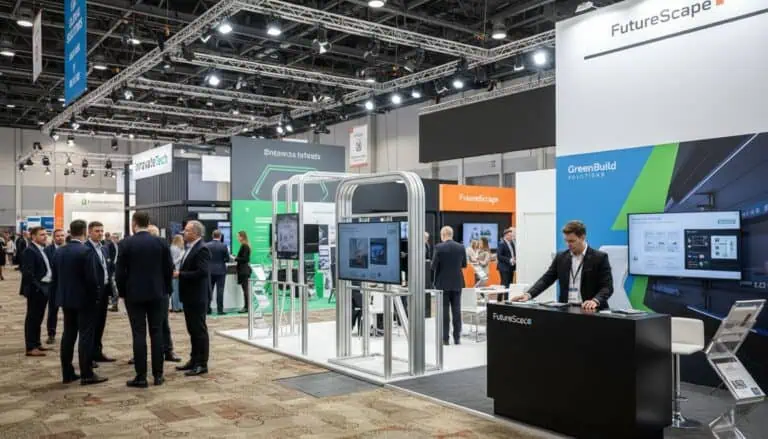
Learning how to set up a trade show booth starts with the confirmed plot, current event instructions and the equipment you will actually use. Plan delivery, installation responsibilities and a practical handover, then check the message, visitor circulation, demonstrations and staff readiness. The setup method must match the display system and the people authorised to install it.
How to set up a trade show booth: the preparation checklist
A portable display assembled by its trained user is different from a contractor-built stand with electrical, structural or suspended elements. Identify which work your team can perform under the event rules and manufacturer’s instructions, and which work belongs to competent installers or appointed service providers.
There is no universal build sequence for every booth. Use the actual installation plan and equipment documentation. The following steps organise the project and readiness checks; they do not replace system instructions or venue requirements. For a broader technical coordination brief, see the exhibition booth assembly guide.
1. Confirm the plot and access arrangements
Keep the stand number, hall, dimensions, open sides, supplied elements and latest floor plan together. Check whether the booked space is a shell scheme, a furnished package or space-only. Identify the boundaries, service positions and any restrictions relevant to the proposed installation.
Read the current event manual and confirm contractor access, installation hours, delivery procedures and required documents. For an IFEMA project, use the official regulations and support resources alongside the specific event instructions. Rules and approvals should come from the actual event, not a generic setup article.
2. Check the layout against the activity
Place the reception point, demonstrations, products, meetings and storage on a scaled plan. Walk through the visitor’s task: approach, understand the offer, enter, take part and leave. Include the space occupied by staff, open cupboards, chairs in use and people waiting.
Keep entrances and circulation usable. Position displays so visitors can inspect them without standing in a neighbouring plot or blocking an aisle. An attractive location cannot substitute for a layout that supports the work; assess the actual plot and the approach routes rather than assuming a corner or entrance guarantees results.
3. Prepare components, content and responsibilities
Use an inventory that identifies the structure or portable displays, graphics, product supports, furniture, equipment, accessories and packing. Check component condition and the supplied instructions before dispatch. For user-assembled portable equipment, arrange a trial assembly where appropriate and permitted by the manufacturer.
Confirm approved artwork dimensions, screen files and demonstration content. Label packages with their contents and destination. Assign an owner to each delivery and installation task, and identify the person who can approve a change. A box arriving at the hall is not proof that the right component or current graphic is inside.
4. Coordinate the installation plan
Agree the installation method and sequence with the responsible installers. Resolve dependencies between structures, services, flooring, graphics and equipment before arrival. Use the documented plan for the actual stand; do not apply a blanket instruction to build the backdrop or floor first.
Confirm electricity, lighting, connectivity and any specialist services through the authorised route. Have the appropriate provider assess the equipment, load and connection requirements. Do not assume a domestic extension lead or additional socket strip is suitable because it fits in a travel kit.
Keep the work area managed during installation and identify who can stop work if something differs from the plan. If a component is missing or damaged, obtain an appropriate resolution from the responsible supplier. Improvised alterations can affect stability, services or approval.
5. Inspect the stand before adding the finishing details
| Check | What to confirm |
|---|---|
| Structure and product supports | Installed and checked by the responsible people according to the applicable documentation |
| Services and cables | Connections completed, routes managed and equipment suitable for the supplied services |
| Graphics and lighting | Current artwork, readable messages, suitable illumination and no disruptive glare |
| Visitor space | Usable circulation and activity areas, with storage and packaging kept out of the way |
| Equipment | Working content, access credentials where required, reset procedure and fallback |
| Handover | Outstanding items recorded with owners, resolution arrangements and a support contact |
Check the main message from the expected approach and at normal viewing distance. Ask a colleague unfamiliar with the design what the offer is and where a visitor should go. Adjust confusing content through the agreed process rather than adding more signs to every surface.
6. Prepare the visitor activity and team
Test a demonstration from start to finish with the people who will run it. Confirm what they will say, how they will help a visitor, how the activity ends and how it resets. Include a usable alternative if the connection or device fails. Games, giveaways or screens should serve the participation objective rather than simply create a queue.
Brief staff on roles, schedules, meeting arrangements, storage, supplies and the support route. Give them a clear way to identify a visitor’s question and pass it to the right colleague. Match the welcome to the audience and environment; being louder does not necessarily make the stand more helpful.
7. Agree the contact and follow-up process
Decide which information your team needs to record, explain the intended use and assign a follow-up owner. Note the visitor’s stated need and the agreed next action. Keep a scanned badge, a conversation and a request for a proposal as distinct categories in your reporting.
The AUMA lead-management guidance helps prepare this workflow. Agree an appropriate response timetable based on the conversation and your team’s capacity. Do not assume every visitor wants the same communication or that contacting everyone within a fixed period guarantees customers.
8. Plan dismantling and the next use
Confirm the authorised dismantling period and the collection arrangements before the event opens. Allocate responsibility for equipment, samples, graphics and rented items. Pack according to the relevant instructions, reconcile the inventory and record damage or missing parts before storage or return.
For reuse, check what needs inspection, cleaning, repair or replacement. Store equipment in conditions suitable for the actual materials and manufacturer guidance. Compare the next event’s plot and requirements before assuming the same configuration can be rebuilt without adaptation.
Frequently asked questions
What equipment should I bring for booth setup?
Use the component inventory and manufacturer or installer requirements for your stand. Confirm any tools, power accessories and service arrangements in advance rather than relying on a universal packing list.
Can our own staff assemble the booth?
Check the event rules, system instructions and the team’s competence. Portable user-assembled equipment and a contractor-built stand require different arrangements; specialist work should be assigned appropriately.
What makes the booth ready to open?
The physical installation, services, content, visitor circulation and staff process should all be checked. Record any unresolved item and agree its owner and resolution before accepting handover.
For help planning how to set up a trade show booth, send Adam Expo Stand the plot and event documents, equipment list and delivery requirements.
Follow our exhibition planning guides
Choose Adam Expo Stand as a preferred source to help you find our exhibition guides and updates on Google.
Add as a preferred source on GoogleGoogle may ask you to sign in and confirm your choice.