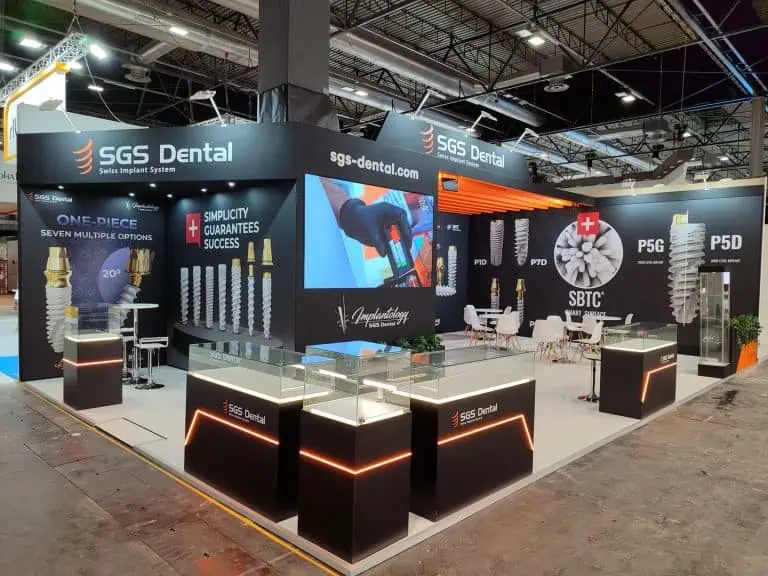
Trade show display ideas should help visitors identify the offer, examine a product and start a useful conversation. Choose the display format around those tasks, the allocated space and the delivery budget. These seven ideas explain what to specify and test, from modular components and graphics to lighting, access, reuse and event support.
Seven trade show display ideas to compare
Start with the current event manual, plot drawing and an inventory of products and equipment. A portable display, hired structure or custom installation can each be appropriate when it fits the activity and venue requirements. Compare the complete specification rather than assuming a particular construction type always costs less or attracts more visitors.

1. Specify a modular configuration for actual plots
A modular system can support different arrangements when the components suit the dimensions and permitted construction. Request a component list and a dimensioned configuration for the booked plot. Identify panel sizes, connections, finishes, graphics and any required specialist installation.
If future use matters, ask for a second feasible configuration using the same identified parts. Check open sides, service positions, transport and storage. A system’s ability to change shape does not establish that every new layout is suitable or that labour and freight will be lower.
2. Give graphics a clear information hierarchy
Separate the message visible from the approach from the detail read at the display. Use a product category, a relevant benefit and enough identification to make the offer understandable. Put supporting evidence and specifications where someone can examine them without blocking other visitors.
Approve artwork at representative scale and check colour, legibility, mounting and replacement requirements. Keep dated claims and product versions under review. Replacing a graphic can be useful when information changes; a compulsory visual refresh at every event is not a condition for a successful display.
3. Choose an interactive display for one useful task
A touchscreen can help compare configurations, find a relevant product or show a process. Define the task before choosing the hardware. Test the actual content, readable text, controls, reset behaviour and the transition into a staff conversation. Include an alternative if the connection or equipment is unavailable.
Do not assume AI, RFID, augmented reality or a large LED wall is standard or necessary for your audience. Add a technology when its contribution, support needs and complete cost can be explained. Interaction counts alone do not establish qualified interest or sales.
4. Light the sample you intend visitors to examine
Inspect the proposed lighting on representative finishes, graphics and screens. Check whether important details are in shadow or whether reflections make content difficult to read. Agree equipment, electrical requirements and installation responsibility with the competent team.
Use lighting effects only where they serve the presentation and meet current event conditions. A product comparison may need consistent illumination rather than a changing colour sequence. Review the scene from the visitor’s position as well as from a promotional camera angle.
5. Make access part of the display plan
Draw the display with people using it. Include open doors, moved chairs, staff, waiting visitors and product handling. Check how someone reaches information, begins a conversation and leaves while another activity continues. Resolve physical access and circulation requirements against the current event and competent design review.
Keep bags, packaging and unused samples in specified storage. Avoid placing every counter on the entrance edge or relying on an empty rendering to demonstrate usable space. A more compact feature can be preferable when it leaves the planned activities workable.
6. Specify reuse and disposal with evidence
Record which components will be retained, who owns them, their condition and where they go after dismantling. Ask how graphics and finishes can be repaired or replaced. Include packing, storage, transport and refurbishment in the proposed reuse plan.
RAI Amsterdam’s Better Stands announcement describes an industry approach to moving away from disposable construction. It does not certify an individual supplier or prove that a particular display has lower emissions. Support environmental claims with the applicable evidence; timber appearance, plants and lightweight construction do not establish performance by themselves.
7. Arrange support for the equipment you are using
Identify who delivers, installs, commissions and removes each item. Agree an event contact, available support, escalation process and the equipment or work excluded. Record how a fault will affect the demonstration and what alternative the team can use.
At handover, check the component inventory, graphics, lighting, screens, storage and agreed finish. Run the presentation using the actual devices and content. Record outstanding items with an owner and deadline. Professional support has a defined scope; its presence does not guarantee uninterrupted operation or remove every exhibitor responsibility.
Compare the complete display cost
| Cost group | Questions for the proposal |
|---|---|
| Structure and graphics | What is owned or hired, and which finishes and replacements are included? |
| Equipment and content | Who supplies screens, software, licences, content and testing? |
| Venue and delivery | Who orders connections, handling, freight and installation? |
| Support and removal | What availability, dismantling, returns and storage are agreed? |
Use the European exhibition budget guide to compare equivalent scopes. Check taxes, estimates, exclusions and change-control terms before selecting a quotation.
To discuss a display with Adam Expo Stand, send the event, plot, product inventory, planned activities and budget scope through the project contact form. Ask for a proposal that identifies the physical specification and delivery responsibilities together.